New · for Microsoft Flight Simulator 2024

REAL-WORLD CLOUDSLIVE IN YOUR SIM

CloudGenMFS reads the real atmosphere layer by layer (cloud cover, moisture, winds and pressure) and injects it into MSFS 2024 as you fly. Flat stratocumulus decks, proper breaks, cirrus that actually looks like cirrus.

MSFS 2024Windows 10 / 11Updates every few minutes AeroTune Pro members save 66%
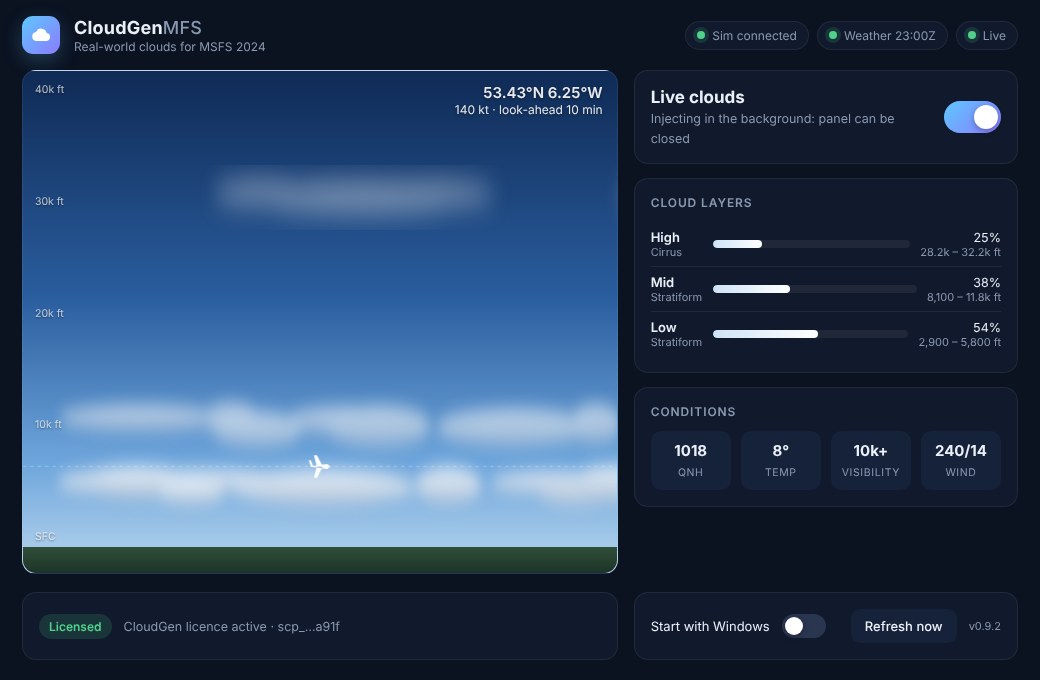
CloudGenMFS desktop app showing low, mid and high cloud layers with altitudes and coverage
LIVE · injecting
// The problem

Live weather that looks… almost right

MSFS builds clouds from sparse weather reports. You get blobby, cotton-wool skies, thin decks where there should be solid ones, and the same look whatever the air is doing.

🌫️ Default live weather

  • Clouds built from airport reports, not the atmosphere above you
  • Puffy "cotton ball" look for every layer type
  • Layer depth and moisture largely guessed
  • No idea what's coming up ahead

☁️ With CloudGenMFS

  • Full vertical profile: humidity and cloud cover at 14 levels up to FL390
  • Stratiform vs convective detection: flat decks with breaks, or towering cumulus
  • Realistic layer depth, density and coverage per layer
  • Looks 10 minutes ahead on your track so weather is ready before you are
// Features

Built for how pilots actually fly

🛰️

Model-grade data

Pressure-level forecast data, not just METARs: cloud cover, relative humidity and winds through the whole column.

🌥️

Smarter cloud types

Uses atmospheric stability (CAPE) to decide between layered stratiform decks and convective cumulus.

💧

Moisture-driven density

Humidity sets how solid each layer is: firmer edges and darker bases when the air is saturated.

🎚️

Smooth transitions

Changes are eased in over a couple of minutes, so no popping skies or sudden walls of cloud.

🧭

Look-ahead on your track

Fetches weather where you'll be, not where you were, refreshed every few minutes and every 15 km.

🪶

Set and forget

Runs in the background. Start with Windows, close the in-sim panel, and it keeps working.

// How it works

Three steps. Then just fly.

Install

Run the CloudGenMFS app and drop the small toolbar package into your Community folder.

Activate

Paste your account key to start your free trial. Already use AeroTuneMFS? Same key: you're set.

Fly

Set weather to Custom and load in. CloudGen takes over the sky and keeps it current as you fly.

// Under the hood

What CloudGen sees

Every refresh, CloudGen samples the atmosphere above and ahead of you and builds three layers (low, mid and high), each with its own base, top, coverage, density and character.

// Pricing

Try it free for 7 days

The trial starts the first time you activate. No card needed. Then one simple yearly price, cancel any time.

CloudGenMFS

Everything, for a full year
£29.99 / year
  • Live real-world cloud layers
  • Moisture, winds and pressure
  • Look-ahead on your track
  • All updates included
Get CloudGenMFS →
Save 66%

AeroTune Pro members

Already have AeroTune Pro?
£9.99 / year
  • Everything in CloudGenMFS
  • Pro price applied automatically at checkout
  • One account, one key for both
  • Pairs with AeroTune's performance tuning
Get it at the Pro price

Download & start your free trial · no account yet? create one free · not a Pro member? see AeroTune Pro

// FAQ

Questions

What do I need?

Microsoft Flight Simulator 2024 on Windows 10 or 11, an internet connection, and a free account. CloudGenMFS runs alongside the sim; set the weather to Custom and open the CloudGen icon on the toolbar once.

Does it hurt performance?

CloudGenMFS only changes the weather the sim is told to draw; it doesn't add rendering work of its own. Heavier cloud cover costs frames in MSFS whatever source it comes from: AeroTuneMFS can manage that for you.

Does it change how the clouds are rendered?

No. Rendering quality (softness, resolution) comes from MSFS and your Volumetric Clouds setting. CloudGen controls what is in the sky: where layers are, how thick, how dense and how broken.

How does the trial work?

Activate with your account key and you get 7 days of full CloudGenMFS. After that, buy a yearly licence or carry on with the sim's own weather. Nothing is charged automatically.

Why does it use an AeroTuneMFS account?

CloudGenMFS is made by the team behind AeroTuneMFS and runs on the same secure account platform. One login and one key work for both products, and if you already use AeroTune you don't need a new account.

I have AeroTune Pro. What do I pay?

£9.99 a year instead of £29.99. Log in with your Pro account at checkout and the member price is applied automatically.

Will it work with other weather add-ons?

Run one weather injector at a time. If you use another weather tool, pause it, or pause CloudGen from its app.
// Ready?

Give your sky a reason to look up

Real-world clouds, live in MSFS 2024. Free for 7 days.

Download & start free trial →